
Content
There are different ways to set the NMEA 2000® system instance and device instance:
- Using the NMEA 2000® menu of the »fpControl Control Panel – Generator«
- Copying a text file via USB to the device
- Transmitting a CAN message
Using the NMEA 2000® menu of the fpControl panel
 NOTE: An »fpControl Control Panel – Generator« is required to configure the settings as described here. Configuration of the NMEA 2000® settings is not possible with an xControl or iControl panel. |
NOTE: The »fpControl Control Panel – Generator« cannot be used to adjust the settings of the »Communication Interface Electric Drive – NMEA 2000®«, as this interface is not compatible with the fpCAN bus. Use one of the other options. |
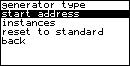
The panel’s NMEA 2000® menu provides the submenus
- generator type,
- start address,
- instances,
- and reset to standard.
Calling the NMEA 2000® menu
Panel menu: Select »NMEA2000«
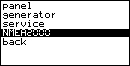
The NMEA 2000® menu is displayed:
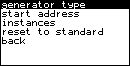
Generator Type
In the submenu »generator type« the selected NMEA 2000® Generator Class can be viewed, which can be set using the DIP switch of the »Communication Interface CI – NMEA 2000®«.
Panel menu: NMEA2000 > generator type
When the DIP switch is in the »Auto« position for automatic detection of generator class, the options »AC (3PH)«, »AC (1PH)« and »DC« are displayed in the menu.
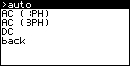
In this mode the generator class can be changed in the panel menu. The class selected in the menu overwrites the position of the DIP switch.
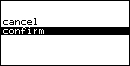
- Select the generator class and confirm.
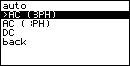
- Select »confirm«.
DIP switch positions for the different NMEA 2000® generator classes
NOTE: Only available for »Communication Interface CI – NMEA 2000®« and »Communication Interface AGT – NMEA 2000®«, not available for »Communication Interface Electric Drive – NMEA 2000®«. |
| SW 2 | SW 1 | Mode |
| 0 [OFF] | 0 [OFF] | automatic detection of generator class (fpControl, xControl) |
| 0 [OFF] | 1 [ON] | 3-phase AC (iSeries) |
| 1 [ON] | 0 [OFF] | 1-phase AC (iSeries) |
| 1 [ON] | 1 [ON] | DC |
Start address
In the submenu »start address« the start address for the claiming process can be set.
Panel menu: NMEA2000 > start address
Example for setting the address:
- Set the address value between its specified minimum and maximum values and confirm.
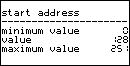
- Select »confirm«.
The rotary coding switch of the »Communication Interface CI – NMEA 2000®« is used to add an offset to the start address for the address claiming process.
Default setting: Rotary coding switch in position »0«. No offset is added to the start address.
Alternative Setting: Rotary coding switch in a position not equal to »0«: [start address] = [position of the rotary coding switch] * 16.
Instances
In the submenu »instances« the different NMEA 2000® instances can be set:
| Instance | Default Value |
| device instance (lsb) | 5 |
| device instance (msb) | 0 |
| system instance | 0 |
| engine instance | 5 |
| temperature instance | 5 |
| AGS instance | 5 |
| Generator instance | 5 |
| ac-/dc-data instance | 5 |
Panel menu: NMEA2000 > instances
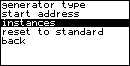
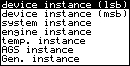
Example for setting an instance value:
- Select an instance value between its specified minimum and maximum values and confirm.
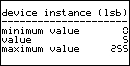
- Select »confirm«.
- Repeat the steps for further instances if neccessary.
NOTE: When using the »Communication Interface CI – NMEA 2000®« on iSeries Generators, the instances of this interface can be set via an »fpControl Control Panel – Generator«. To set the instances, the fpControl Panel must be connected to the NMEA 2000 interface and then it must be paired with the NMEA 2000 interface. This can only be done in the factory menu of the panel (admin password required). Once the interface and panel are paired, after switching on the message “device not supported!” appears on the fpControl panel. This message can be ignored. |
Reset to standard
In the submenu »reset to standard« all settings of the NMEA 2000® menu can be reset to the default values.
Panel menu: NMEA2000 > reset to standard
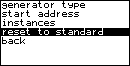
- Select »confirm« to reset.
Copying a text file via USB to the device
NOTE: To access the USB port of the communication interface, the circuit board must be removed from the housing. |
The NMEA2000 instances can be set by copying a text file via USB to the device. The file name must be »insts.set«. The file content is dependent on the firmware version and must be structured exactly as follows: Communication Interface AC / AGT with firmware version <= 2.07 and Communication Interface Electric Drive with firmware version >= 1V11: ECU:<no> FCT:<no> VSYS:<no> ENG:<no> BAT:<no> CON:<no> Replace <no> with the instance number. See an example of the file content here: ECU:1 FCT:0 VSYS:0 ENG:1 BAT:2 CON:0 Communication Interface AC / AGT with firmware version <= 2.10: ECU:<no> FCT:<no> VSYS:<no> ENG:<no> AGS:<no> GEN:<no> AC:<no> Communication Interface AC / AGT with firmware version > 2.10: ECU:<no> FCT:<no> VSYS:<no> ENG:<no> TMP:<no> AGS:<no> GEN:<no> AC:<no> Note: Bus1 needs to be powered in order to transfer the file/use the USB port in version 2.11. Download a sample file here and adjust it to the instances needed: »insts.set«. |
Transmitting a CAN message
You can change the NMEA device instance (ISO-ECU instance). Use the PGN 126208 to request the ISO address claim message PGN 60928. Specify the fields 3 and 4 in the request. For a detailed description, use the original documentation from the NMEA that has to be bought from the NMEA website.
Transmit a CAN message with the following content (for Communication Interface Electric Drive transmit the CAN message to address 17, 0x11 hexadecimal):
| Data Byte | Content | Description |
| 0 | ‘F’ | |
| 1 | ‘P’ | |
| 2 | ECU | device type instance used by the name field |
| 3 | FCT | function instance used by the name field |
| 4 | VSYS | vehicle system instance used by the name field |
| 5 | ENG | engine instance used by PGN 127488 / 127489 |
| 6 | BAT | battery instance (to transmit voltage and current), used by PGN 127508 |
| 7 | CON | connection instance, used by PGN 127751 |
The NMEA 2000® ECU instance is a combination of ECU and FCT. For further information refer to the NMEA 2000® documentation. |