
The generator control fpControl offers two multifunctional outputs. You can configure the function of these digital outputs in the service menu of the control panel. This is useful, for example, to extend the functionality of the generator control. For each of the two outputs several profiles are available.
If more than two multifunctional outputs are required, the number of outputs can be expanded by 8 using the external IO module. Which functions you can implement with these additional outputs and how to configure them you will learn in section »Configuring the outputs of the external IO module«.
Requirement
You must enter the service password while the function is being called.
Function call
Select in the menu service > enter service-code > multifunc. outputs.
Selecting the multifunctional output and the profile
- Call the dialog “multifunc. outputs”.
- Select the multifunctional output to be configured:
- mode of output 1
- mode of output 2
- Select the profile for this multifunction output.
- Confirm your selection.
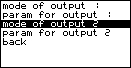
In this example, the profile “on start (+delay)” is selected and confirmed for the multifunction output 1 (mode of output 1).
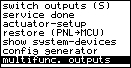
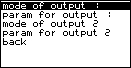
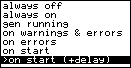

Available profiles for the multifunctional outputs of fpControl
| always off | The output is always switched off. |
| always on | The output is always switched on. |
| gen running | The output ist switched on when the generator is in the »running« state and the load contactor is closed. |
| on warnings & errors | The output is switched on when the generator control is in a warning or an error state. |
| on errors | The output is switched on when the generator control is in an error state. |
| on start | The output is switched on immediately after the start/stop button is pressed. The output remains on until the generator is stopped by the pressing the start/stop button again. |
| on start (+delay) | The output is switched on with the start request. The generator starts delayed after the delay time has run out. You can set the delay time under »param for output 1 (2)«. |
| external fuel pump | Profile available from software release 0V07 of »fpControl GC-S« and release 5V04 of »fpControl GC-P«. The output switches the fuel pump on and off depending on the filling level supplied by an external CAN bus tank sensor. This profile is required for the tank refill function of fpControl. Note: This profile can only be used with multifunction output 2 (5 A). |
Setting the parameter value for the selected profile
 |
| NOTE: You cannot set a parameter value for each profile. Currently, only the profile »on start (+delay)« has an adjustable parameter. If you have selected a profile for which you cannot set a parameter value, you will see a dialog in which the minimum and maximum values are set to »0«. |
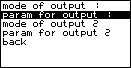
- Select for which multifunction output the parameter value should be set:
- param for output 1
- param for output 2
- Set the parameter value.
- Confirm your adjustment.
Repeat the steps for the second multifunction output, if necessary.
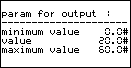
In this example, the profile “on start (+delay)” is selected and confirmed for the multifunction output 1 (param for output 1). The delay time in [s] can be set between 0.1 s and 60.0 s in 0.1 s increments.
Configuring the outputs of the external IO module
The number of outputs of the generator control fpControl can be expanded by 8 using the external IO module. You can configure the function of these digital outputs in the service menu of the control panel. For each of the outputs several profiles are available.
Requirement
You must enter the service password while the function is being called.
Function call
Select in the menu service > enter service-code > back > external outputs.
Selecting the external output and its mode
- Call up the service menu.
- Enter the service password.
- Return to the panel menu with »back«.
- Call up the dialog »external outputs«.
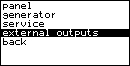
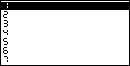
- Select the external output to be configured (1 – 8).
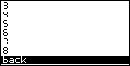
- Select »mode«
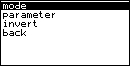
- Select the profile for this external output.
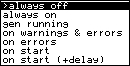
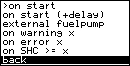
- Confirm selection.

Available profiles for the multifunctional outputs of the external IO module
In addition to the profiles described in section »Available profiles for the multifunctional outputs of fpControl«, the following profiles can be selected for the outputs of the external IO module:
| on warning x | A warning event code can be specified for »x«. When this warning occurs, the output is activated. The warning event code is set as parameter value in the menu »parameter«. |
| on error x | An error event code can be specified for »x«. When this error occurs, the output is activated. The error event code is set as parameter value in the menu »parameter«. |
| on SHC >= x | SHC..Service Hour Counter – It can be set that the output is switched on from hour »x« of the SHC. The switch-on operating hour is set as parameter value in the menu »parameter«. |
Setting the parameter value for the selected mode
|
| NOTE: You cannot set a parameter value for each profile. If you have selected a profile for which you cannot set a parameter value, you will see a dialog in which the minimum and maximum values are set to »0«. |
- Select »parameter«.
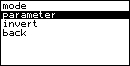
- Set the parameter value.
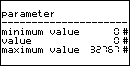
- Confirm the set value.
Inverting the output
- Select »invert«.
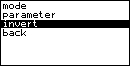
- Select »yes« to invert the output, otherwise select »no«.
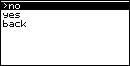
- Confirm selection.
- Repeat the steps for further external outputs, if necessary.
Appendix
Controls
| Symbol | Function |
 | »Increase parameter value« key. A long press on the key activates the rapid increase of the parameter value. |
 | »Decrease parameter value« key. A long press on the key activates the rapid decrease of the parameter value. |
 | »Confirm parameter value« key. |