Introduction to the topic
The service hour counter of the »fpControl GC-S« is incremented while the generator is in operation.
After the service interval has expired, a warning is generated on the control panel.
You can reset the service interval in the service menu, after the service has been carried out on your generator. Resetting the service interval sets the counter value to »0:00h«.
Resetting the Service Interval
Function call
Panel menu: generator > service done.
Step by step guide
- Open menu »generator«.

- Select »service done«.

- Select »confirm«.

Result: The Service Interval is reset to »0:00h«.

Resetting the Service Interval for VS-Generators with TQ System
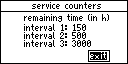
There are 3 interval counters:
- 150 h
- 500 h
- 3000 h
When reset, the respective counter is set to the OHC level.
Function call
Panel menu: generator > service done.
Step by step guide
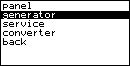
- Open menu »generator«.
- Select »service done«.
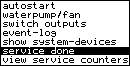
All counters can be reset simultaneously (menu item »SHC«) or each of the three counters can be reset separately (menu items »interval 1«, »interval 2«, »interval 3«).
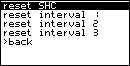
- Select the desired option, e. g. »SHC« for all 3 interval counters.
- Select »confirm«.
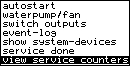
- The counter readings can be viewed calling »generator > view service counters«.