
 Note: This function is not available if the »fpControl CAN Interface – SAE J1939« is operated in an iControl system. |
The »fpControl CAN Interface – SAE J1939« (fpControl CI-SAE J1939) can be configured to generate a wake-up signal as soon as the interface on the customer bus side (FP CAN BUS 2) is supplied with voltage. This function is equivalent to pressing the power button and allows the overriding control system to switch the generator from sleep to standby mode or vice versa.
Modes of the wake-up function
| Mode | Wake-up function |
| off | No wake-up function active. »fpControl GC-S« of single generator 1 and single generator 2 can only be switched on / off separately. |
| 1 controls 2 | Switching the »fpControl GC-S« of single generator 1 on / off causes the »fpControl GC-S« of single generator 2 to be switched on / off at the same time. |
| 2 controls 1 | Switching the »fpControl GC-S« of single generator 2 on / off causes the »fpControl GC-S« of single generator 1 to be switched on / off at the same time. |
| each other | Switching one of the two »fpControl GC-S« on / off also switches the other »fpControl GC-S« on / off. |
Setting the wake-up function
Function call: service > show system-devices
Step by step guide
- Open menu “service”.
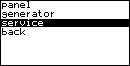
- Enter the service password.
- Select “show system-devices” and confirm.

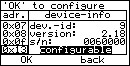
- Select the address of the CAN interface (adr. 0x13) and confirm with OK.
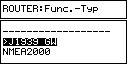
- Select Router: Func.-Typ “J1939 GW” and confirm.
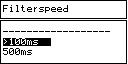
- Select Filterspeed “100ms” and confirm”.
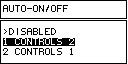
- Select the wake-up function (AUTO-ON/OFF) “1 controls 2”/“2 controls 1” or “each other”and confirm. NOTE: Mode “2 controls 1” is required so that the customer bus (FP CAN BUS 2) can be used to wake up.
- Changes are being applied.

Result: The wake-up function is set to the selected mode.