
Marine multifunction displays (MFDs) are able to display generator data like AC voltage, AC current, AC frequency and AC power using the NMEA 2000® or J1939 network. Fischer Panda Generators equipped with xControl, iControl2 or fpControl can be connected with an NMEA 2000® network using the »Communication Interface CI – NMEA 2000®« (fpControl CI-NMEA 2000®). In this way, the generator data can be displayed on the MFD. But not all MFDs support all relevant PGNs.
Which generator data can be viewed on which Marine MFDs?
As a generator manufacturer, we are interested in which operating data of the generator are shown on a multifunction display and which operating options the device offers for generators.
To test which generator data can be displayed on current MFDs, we took a closer look at these four models:
- Lowrance HDS7 Live (Version 19.1, Application 62.1.153, Platform 35.0-92-g8c242f836)
- Raymarine Axiom 7 (Operating System LightHouse 4, Software Version: LH4.7.182, October 2024)
- Garmin GPSMAP 722 Plus (Software release 28.41, Q4 2024 marine software update, October 2024)
- CZone Touch 5 (Software Version 6.12.4.0)
Not all devices that we tested interpret the NMEA 2000® PGNs for AC information (PGN 127744 to 127749), which are supported by the »fpControl CI-NMEA 2000« to provide the AC values of the generator. However, because NMEA 2000® is based on and compatible with SAE J1939, some MFDs support the J1939 PGNs for electrical data specified in J1939-75.
A detailed documentation of the NMEA 2000® PGNs has to be bought from the NMEA website (https://www.nmea.org).
A detailed documentation of the J1939 PGNs has to be bought from the SAE International website (SAE J1939-75 Generator Sets and Industrial Applications, https://www.sae.org).
Detailed information on the supported PGNs of the tested MFDs can be found on the respective manufacturers’ websites.
Lowrance: SDL LiveContent Architect INSTALLATION MANUAL – NMEA 2000 compliant PGN List
Garmin: NMEA 2000 PGN Information
»fpControl CI-NMEA 2000« supported PGNs
| PGN # | Content |
| 61444 | Electronic Engine Controller #1 |
| 64911 | Generator Total AC Percent Power |
| 65019 | Generator Phase C AC Reactive Power |
| 65020 | Generator Phase C AC Power |
| 65021 | Generator Phase C Basic AC Quantities |
| 65022 | Generator Phase B AC Reactive Power |
| 65023 | Generator Phase B AC Power |
| 65024 | Generator Phase B Basic AC Quantities |
| 65025 | Generator Phase A AC Reactive Power |
| 65026 | Generator Phase A AC Power |
| 65027 | Generator Phase A Basic AC Quantities |
| 65030 | Generator Average Basic AC Quantities |
| 65253 | Engine Hours |
| 126993 | Heartbeat |
| 127488 | Engine Parameters, Rapid Update |
| 127489 | Engine Parameters, Dynamik |
| 127504 | AC Output Status |
| 127512 | AGS Configuration Status |
| 127514 | AGS Status |
| 127744 | AC Power / Current Phase A |
| 127745 | AC Power / Current Phase B |
| 127746 | AC Power / Current Phase C |
| 127747 | AC Voltage / Frequency Phase A |
| 127748 | AC Voltage / Frequency Phase B |
| 127749 | AC Voltage / Frequency Phase C |
| 130316 | Temperature, Extended Range |
Customisation of the display pages
The MFDs come with basic page layouts and display elements. You can assign the data (SPNs) of the NMEA 2000® / J1939 network to these elements according to your own needs.
There are no predefined page layouts for displaying the electrical parameters of the generator. Such pages must be configured by the user.
 Note: Not all display elements of the basic page layouts can be assigned all available SPNs. Some basic elements can only be assigned SPNs that contain data from the diesel engine. |
Note: To configure the CZone system the »CZone Configuration Tool« is required. To build multiple favorites pages »CZone Favorites Tool« is required. Both software tools are available to technical CZone customers from downloads.czone.net. |
Conclusion
A great deal of AC information from the generator can be displayed on the »Lowrance HDS7 Live«. This is because it supports the J1939 PGNs for electrical data specified in the SAE J1939-75.

The »Garmin GPSMAP 722 Plus« displays a basic supply with the most important AC Information (AC voltage, AC current, AC frequency and the voltage of the starter battery (alternator potential)). Furthermore, the device shows the most important data of the diesel engine (rpm, engine load, engine coolant temperature, oil pressure and the total engine hours).
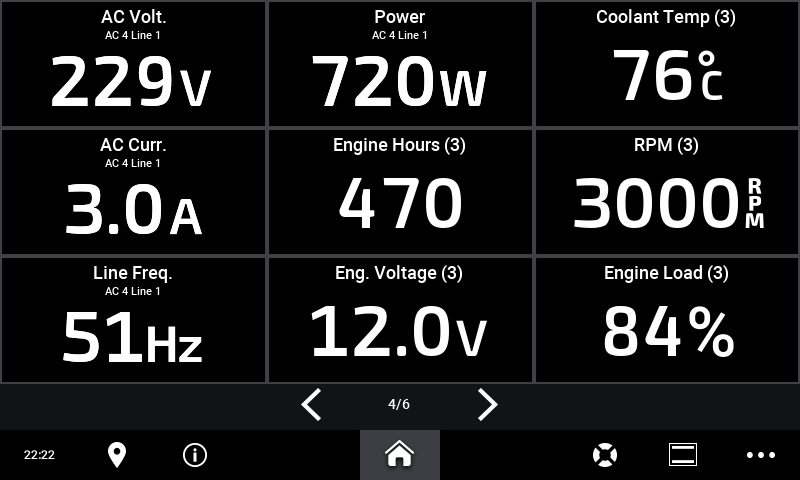
Users of the »Raymarine Axiom 7« can display any AC information from their Fischer Panda generator on the MFD. Raymarine has officially released the updated version of the LightHouse software that allows generator start/stop from their MFD. This feature is available from LightHouse version 4.6.103.
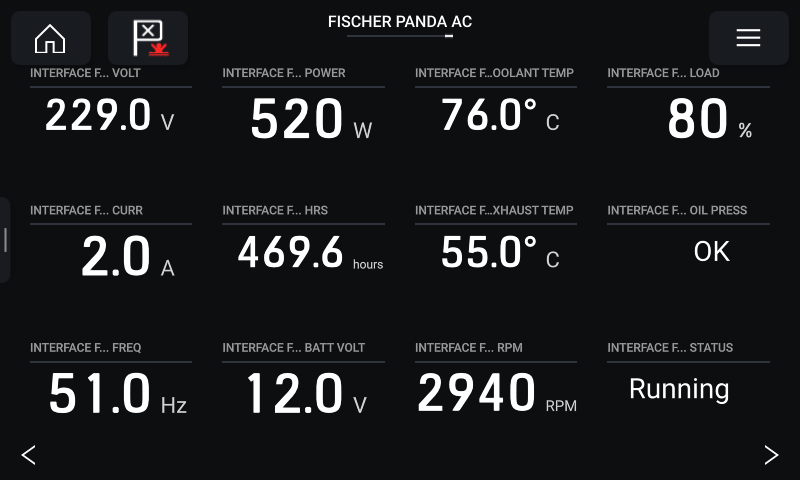
Users of the »CZone Touch 5« cannot display any AC information from their Fischer Panda generator on the MFD. This device only uses two PGNs from the set of PGNs that Fischer Panda supports (NMEA 2000® PGN 127488 and 127489). So it is possible to display rpm, oil pressure, engine coolant temperature, voltage of the starter battery and total engine hours.

Note: The generator can only be started/stopped with the »Raymarine Axiom 7«. The original generator control panel is still required in any case. |