
Legacy protocol / Legacy interface / Legacy mode
The serial communication protocol of the iControl2 is no longer used as the standard protocol in the iControl3, but it remains optional for compatibility reasons.
For panel version 3.5, Network ID 0 must be set for the CAN protocol and Network IDs 1, 2, 3 and 4 for the Serial protocol.
From panel version > 3.5 onwards, the communication protocol can be selected via the menu item »Protocol« of the iControl3 panel.
This is needed for the parallel operation of inverter generators.
Set up the communication protocol for paralleling (Legacy Mode)
- Calling up the Set-up menu:
- Switch on the iControl2.5/iControl3 system using the on/off button.
- Press the cursor-up button while the hardware/software versions are being displayed on the start screen.
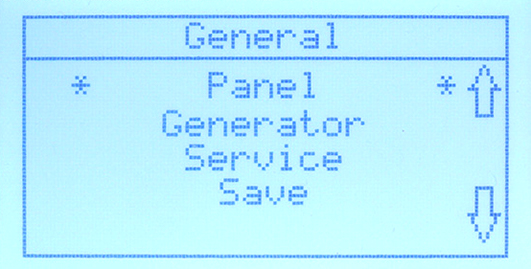
- The start page of the set-up menu is displayed with its submenu items.
- Select »Panel« and confirm with the start/stop button.
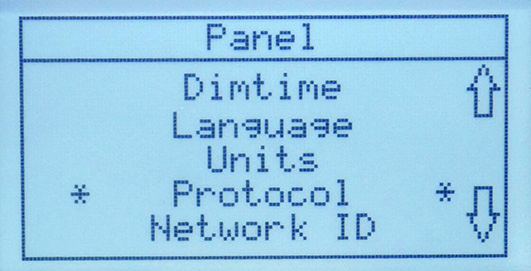
- Scroll down to »Protocol« and confirm with the start/stop button.
- Select »Serial« and confirm with the start/stop button.
 NOTE: When switching to »Serial« the communication might be interrupted. In this case, disconnect and reconnect the starter battery. The system then restarts. NOTE: It might be happen that the control panel display »freezes« in the first 30 seconds or that error 130 appears (NO CONNECTION). |
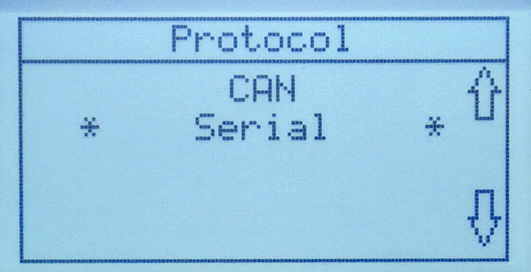
- The serial protocol is set.
Disconnect / connect the starter battery
- Disconnect the starter battery from the generator.
- Wait about 10 seconds.
- Connect the starter battery to the generator.
- If error 130 occurs, wait up to 30 seconds, it should solve automatically.