
The control panel saves continuously a backup of the operating hours in its memory. If the fpControl/xControl control unit has been replaced, different operating hours are saved on the control unit and in the backup-memory of the panel. After switching on, an information message may appear: »OHC asynchronous – adjustment in service menu needed« (OHC … Operating Hours Counter).
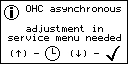
Note: This message is not a warning nor an error. It is for informational purposes only and does not affect the operation of the generator.
The operating hours stored on the control unit (MCU) and in the backup-memory of the panel (PNL) can be displayed using the »arrow up« button:
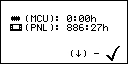
Pressing the »arrow down« button acknowledges the message. Note: The values are not yet synchronized after confirming this message.
The following cases must be considered:
- A panel whose OHC backup value is higher than the value stored in the control unit generates an information message.
- A panel whose OHC backup value is lower than the value stored in the control unit takes over the larger value of the control unit without generating an information message.
Situation with multiple panels on the bus:
All panels whose OHC backup value is higher than the value stored in the control unit generate their own information message. If the panels have different OHC backup values, the larger value must always be taken over when synchronizing so that no information message occurs on any of the panels.
Example with a new control unit and two panels having different OHC backup values:
The control unit is new because it was replaced: 0 h
Panel 1 has 886: 27 h
Panel 2 has 9451: 30 h
If the smaller OHC backup value from Panel 1 is now taken over into the control unit, Panel 2 will generate an information message again when restarted due to its larger backup value.
However, if the larger OHC backup value from Panel 2 is taken over into the control unit, Panel 1 also takes this value. In this case no further OHC information message occurs when the system restarts. The control unit and both panels now have the same – the larger – value saved.
Synchronizing the operating hours
The operating hours stored in the backup-memory of the panel can be restored to the control unit using the service menu.
Requirement: To restore the operating hours from the backup-memory of the panel you must enter the service password.
Function call: service > enter service-code > restore (PNL>MCU)
Step by step guide
- Open menu “service”.
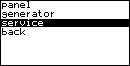
- Enter the service password.
- Select “restore (PNL>MCU)” and confirm.
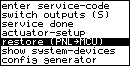
- “result: ok” is displayed.
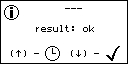
- Press the »arrow up« button to see the result.
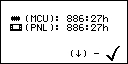
- Press the »arrow down« button to acknowledge.
- Leave the service menu.
Result: The operating hours stored in the backup-memory of the panel have been restored to the control unit. Both devices (MCU and PNL) display the same operating hour values.