Note: This function is not available with every generator. Check in each individual case whether the function can be used with your generator. |
Objective of the procedure
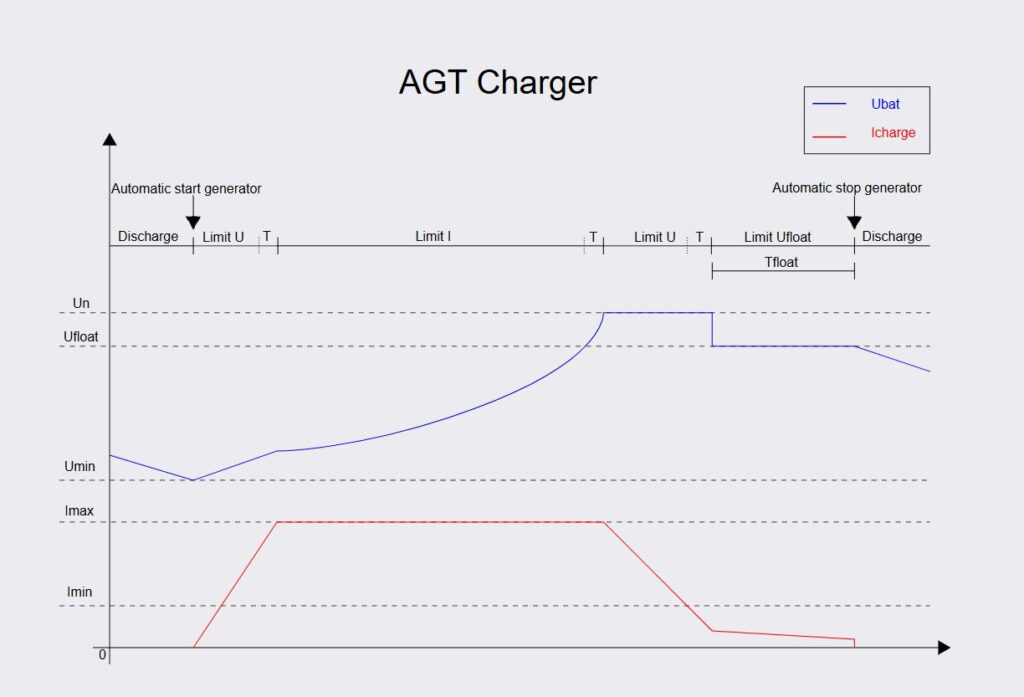
You can set the charging curve parameters of the battery charger. This is necessary to adapt the battery charger to different battery types.
- Determine the battery voltage at which the battery charger starts automatically.
- Adjust the maximum charging current that flows to the battery.
- Specify the constant charging voltage (absorption voltage).
- Adjust the minimum charging current.
- Determine the hysteresis, after that is switched from charging with constant voltage to float voltage.
- Set the float voltage that maintains the fully charged state after charging the battery.
- Specify the float voltage timeout, after that the generator stops automatically.
- Activate and deactivate the battery guard.
- Set the charger mode.
- Set the voltage droop.
Function call
Select in the menu generator > battery-charger.
Software concept
The »battery-charger« menu gives you an overview of the parameters that you can adjust on the first page. You can use the panel’s arrow keys to navigate through the list of parameters. Each menu item takes you to a sub-page where you can set the selected parameter between its specified minimum and maximum values.
- Select a menu item.
- Set the parameter.
- Confirm your adjustment.
- Repeat steps 1 to 3 for additional parameters, if necessary.


Controls
| Hardkey | Function |
 | “Increase parameter value” key. A long press on the button activates the rapid increase of the parameter value. |
 | “Decrease parameter value” key. A long press on the button activates the rapid decrease of the parameter value. |
 | “Confirm parameter value” key. |
Parameters
| min. voltage [V] | Battery voltage at which the battery charger is started automatically. |
| absorption voltage [V] | Constant charging voltage until the charging current has dropped to the minimum value (parameter min. current). |
| float-voltage [V] | After charging the battery, the float-voltage ensures that the fully charged state of the battery is maintained for the duration of the “float-timeout”. |
| min. current [A] | If the charging current goes below its minimum value, the battery is fully charged. At this point the hysteresis starts until the switchover to the float voltage. |
| max. current [A] | Maximum charging current flowing to the battery. |
| hysteresis [ms] | Time T, until the control switches from voltage to current control and vice versa, to prevent constant switching between voltage and current control. After this time is switched to the maintenance voltage. |
| battery guard [On/Off] | “On” – enable battery guard, automatic generator start / stop is enabled. The generator is started automatically when the battery voltage drops below its minimum (parameter min. voltage). “Off” – disable battery guard, automatic generator start / stop is disabled. |
| float-timeout [min] | After termination of the float-timeout, the generator is stopped automatically if the battery guard is activated. |
| mode | BMS, UIU |
| voltage droop [V] | the decrease in voltage output as the load (current draw) increases |