
Introduction to the topic
 Note: Since this function is new, it is not jet available with every generator. Check in each individual case whether the function can be used with your generator. |
In service mode you can start the generator without power electronics. This may be necessary, for example, in case of service work.
The service mode must be activated in the service menu of the »fpControl Control Panel – Generator« (fpControl CP-G).
When the service mode is active, the parameter overview page shows a tool symbol next to a caution symbol.
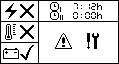
The generator can then be started with the start / stop button of the Control Panel.
Caution symbol and tool symbol are still displayed during operation in service mode.
The monitoring of error events of the diesel engine (RPM, oil pressure, engine temperature and DM01) is also active in the service mode.
Note: Error events of the power electronics are excluded from the error monitoring in the service mode, since the necessary measuring devices are missing. |
Note: For normal operation of the generator with connected power electronics, the service mode must be deactivated in the service menu of the Control Panel to prevent unintentional use. |
The service mode is automatically deactivated after a power cycle of the »fpControl Generator Control – Servo« (fpControl GC-S«).
Software Requirements
- »fpControl Generator Control – Servo« (fpControl GC-S): expected in 0V20 or higher
- »fpControl Control Panel – Generator« (fpControl CP-G): 5V08RC11 or higher
Activating / deactivating the Service Mode
The service mode may only be used by authorized specialist personnel. |
The service mode can be activated / deactivated using the control panel.
Function call
Panel menu: service > service-mode > turn on / off.
Step by step guide
- Open menu »service«.
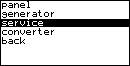
- Enter the service password.
- Select »service mode« and confirm.
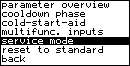
- Select »on« to activate / »off« to deactivate the service mode and confirm.

- Result: The service mode of the fpControl is activated / deactivated. In case of activation the parameter overview page of the Control Panel shows a tool symbol next to a caution sign.